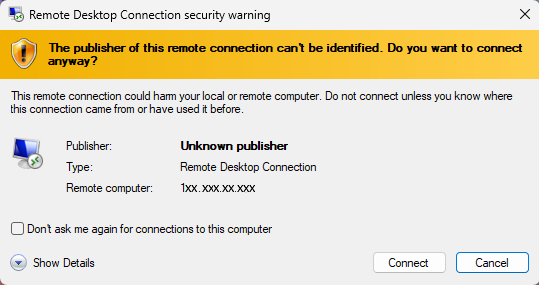
How to Remove the “Unknown Remote Connection” Warning on a RDP File or Shortcut

This warning cannot be skipped when using a Remote Desktop saved file or shortcut.

What is Unknown Remote Connection Warning for?

When connecting to a VPS or server using Remote Desktop, Windows may display a security warning: “Unknown remote connection.” This message is designed to protect users from potentially unsafe or malicious connections.

Why the Warning Appears

  • Unverified Certificate: Windows cannot confirm the identity of the remote computer because the certificate is not issued by a trusted Certificate Authority (CA).

  • Self-Signed Certificates: In many organizations, IT teams generate their own certificates. These are valid internally but appear “unknown” to Windows by default.

  • Security Reminder: The warning ensures users pause and verify before connecting to servers they may not recognize.
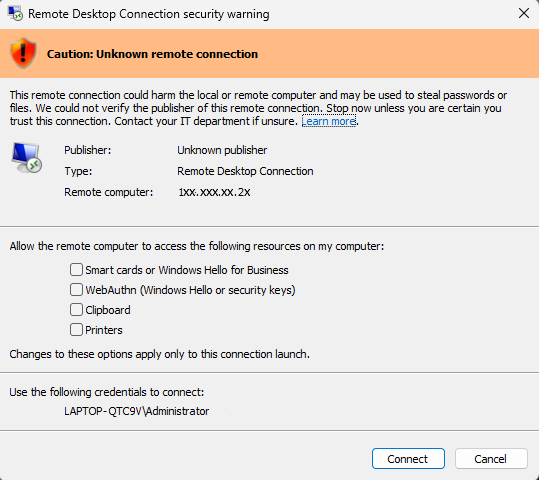
The “Unknown remote connection” warning is normal when using self‑signed certificates. As long as you recognize the server, it is safe to click Connect and proceed. The warning is simply Windows reminding you that the certificate isn’t from a public CA — not that the connection itself is malicious.

Starting with the April 2026 Windows security update, the Remote Desktop Connection app displays new security warnings when you open RDP files or shortcuts that appear every time you connect to your VPS.

Here are the steps to remove this Warning

Option 1: Using ChartVPS Toolkit (Recommended)

The easiest way to remove this warning is by using our ChartVPS Toolkit, a one-click solution that applies the fix automatically.
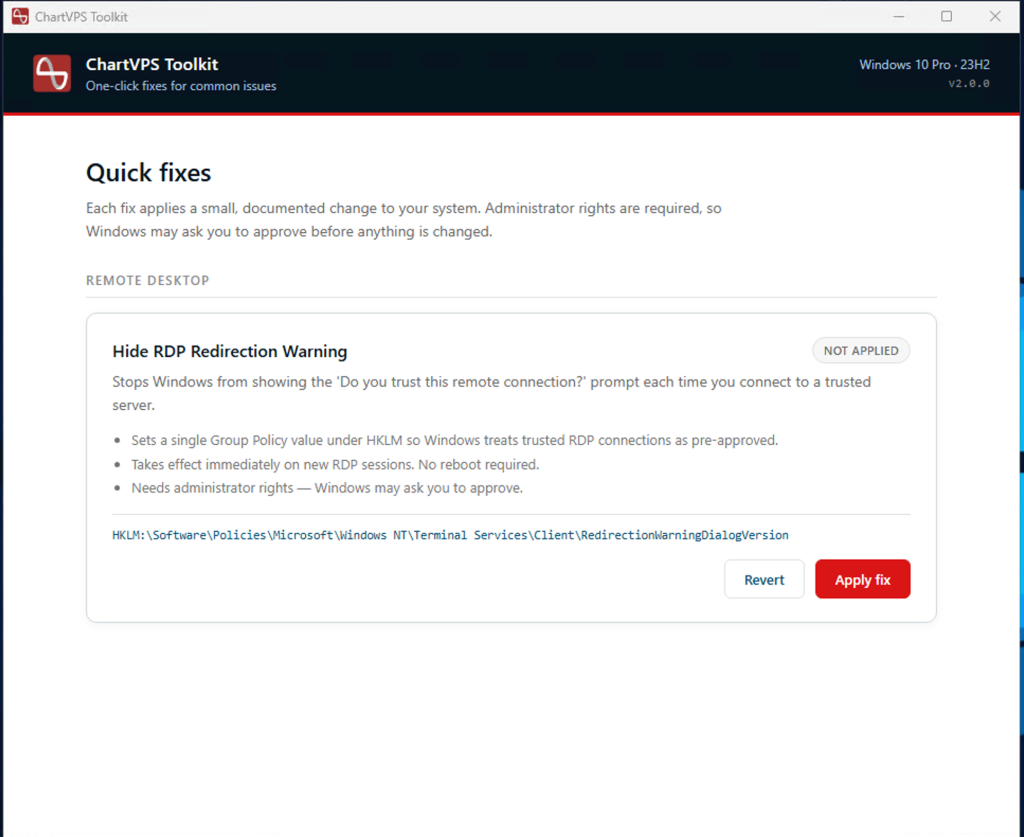
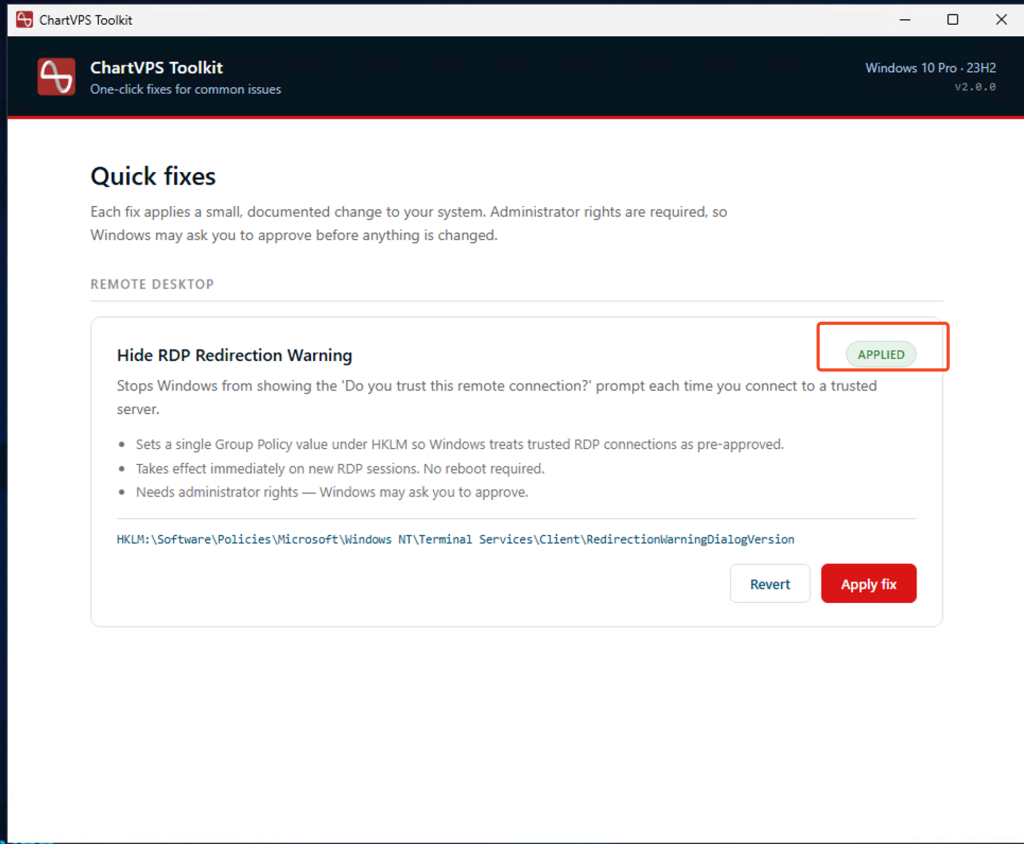
Important : The ChartVPS Toolkit must be installed on your local computer (the computer you use to connect from), not on your VPS or remote server.

1
Download and install the ChartVPS Toolkit on your local computer.
2
Open the ChartVPS Toolkit.
3
Under Quick fixes > Remote Desktop, find “Hide RDP Redirection Warning” and click the Apply fix button.

That’s it, the fix takes effect immediately on your next RDP session. No reboot required.
If you ever need to undo the change, open the Toolkit and click Revert on the same fix.

Option 2: Removing warning using PowerShell

1, Open PowerShell as Administrator
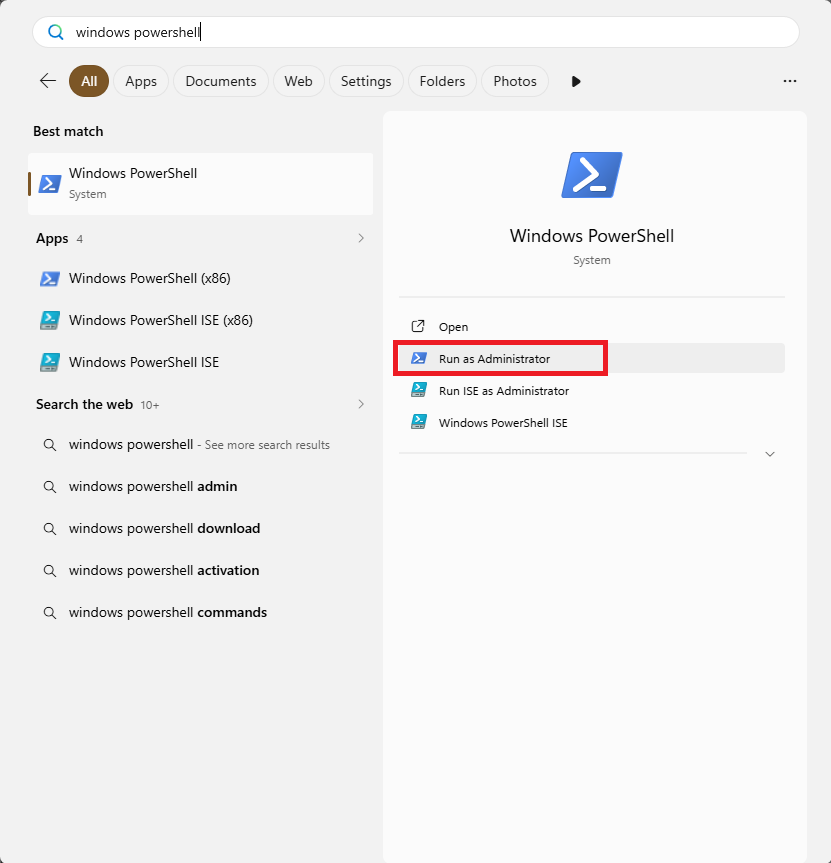
2. Run the following command:
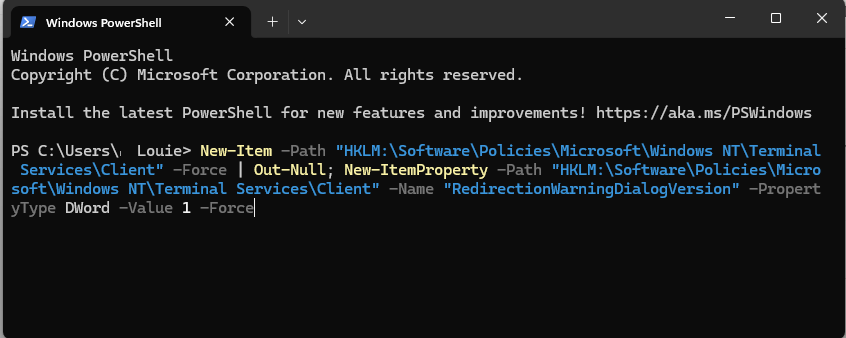
New-Item -Path “HKLM:\Software\Policies\Microsoft\Windows NT\Terminal Services\Client” -Force | Out-Null; New-ItemProperty -Path “HKLM:\Software\Policies\Microsoft\Windows NT\Terminal Services\Client” -Name “RedirectionWarningDialogVersion” -PropertyType DWord -Value 1 -Force

Option 3: Removing warning using Registry Editor

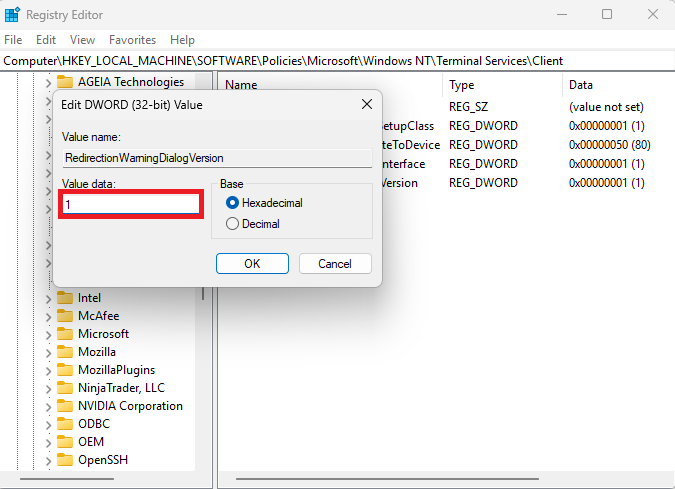
1. Open Registry Editor
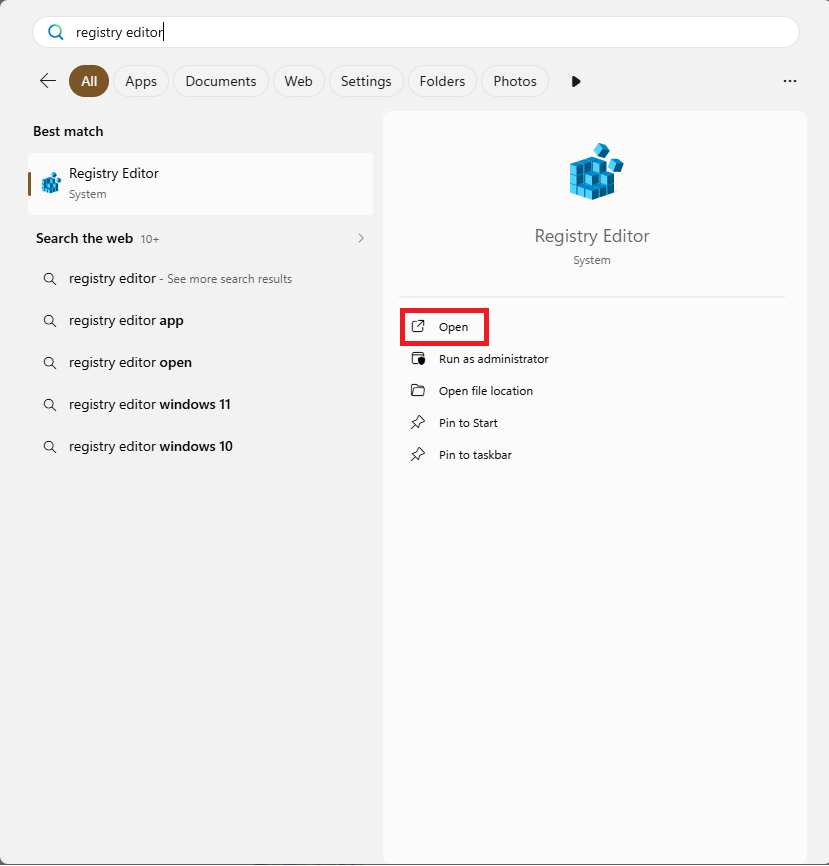
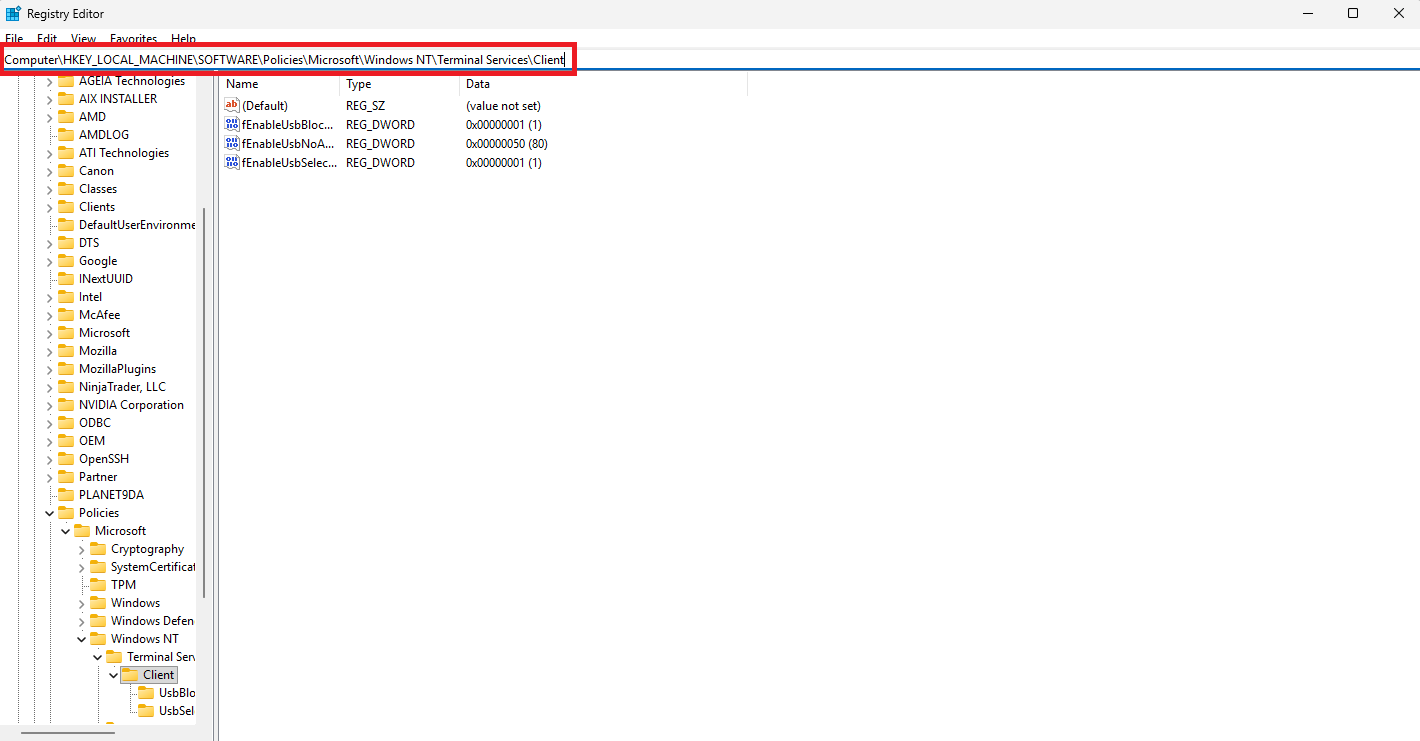
2. Navigate to Computer\HKLM\Software\Policies\Microsoft\Windows NT\Terminal Services\Client
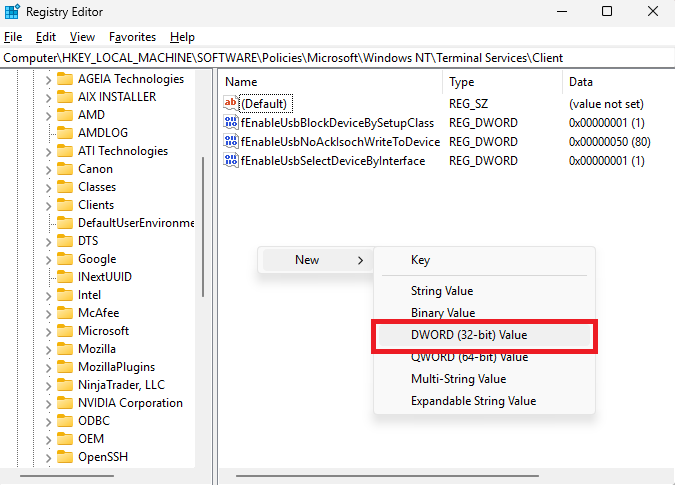
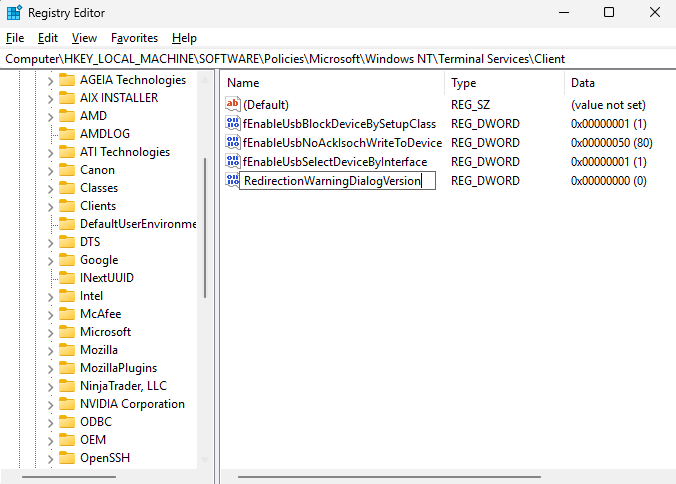
3. Create a new DWORD (32-bit) Value by right-clicking on the blank part and change name to RedirectionWarningDialogVersion
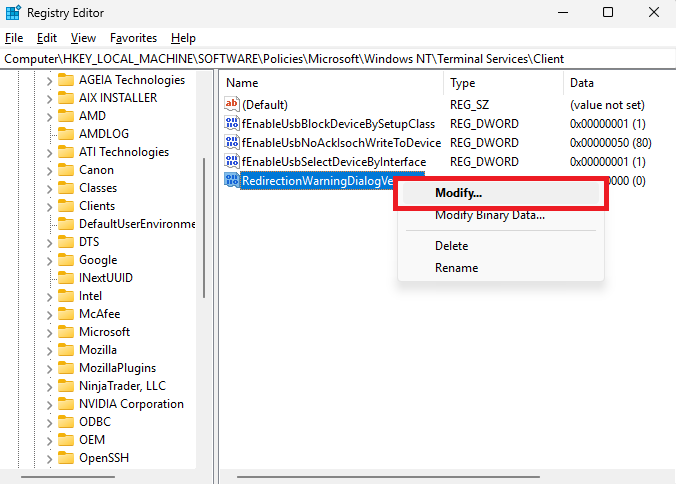
4. Right-click to Modify and change the Value data from 0 to 1 and click OK
After completing the steps, the warning dialog will revert to its previous version which allow to select “Don’t ask me again”. Enabling this will prevent the warning from showing again.

Remove this warning at your own risk.
If you ignore this warning, here’s what could happen:

  • Phishing Attacks: You might accidentally connect to a server controlled by attackers if you open malicious .rdp files.

  • Credential Theft: Your saved passwords or login info could be exposed over an unsigned connection.

  • Resource Sharing Risks: Things like your clipboard, printers, or drives might get shared with unsafe servers without you realizing it.

Why removing this Warning?

  • Saves Time: Avoids unnecessary interruptions when connecting to trusted servers.

  • Streamlines Workflow: Enables quicker access to remote resources without repeated confirmations.

  • Reduces User Confusion: Prevents alarm for known and safe connections, improving user experience.

Disclaimer: ChartVPS provides Remote Desktop services with the option to use self-signed certificates. While the “Unknown remote connection” warning is expected in this setup and can be safely skipped when connecting to ChartVPS servers, ChartVPS will not be responsible for any security incidents, data loss, or unauthorized access resulting from connections to servers outside of ChartVPS infrastructure or from ignoring security warnings without proper verification.
Was this article helpful?

Job Post Form Pop up

[mepr-membership-registration-form id="13707"]
[mepr-membership-registration-form id="13708"]
[mepr-membership-registration-form id="13633"]
[mepr-membership-registration-form id="13635"]
[mepr-membership-registration-form id="13634"]
We value your privacy
We use cookies to enhance your browsing experience, serve personalized ads or content, and analyze our traffic. By clicking "Accept All", you consent to our use of cookies.
Reject All
Accept All
Customize
We value your privacy
We use cookies to enhance your browsing experience, serve personalized ads or content, and analyze our traffic. By clicking "Accept All", you consent to our use of cookies.
Reject All
Accept All
Customize