


Common Causes of VPS Credential Issues
-
Incorrect Username or Password Entry: First things first: make sure you’re entering the right username and password with no typos. Passwords are normally case-sensitive, but usernames typically aren’t, so there’s no need to watch your capitalization with your username.
-
Caps Lock or Keyboard Layout Issues: Check that Caps Lock is off and that your keyboard layout matches what you’re typing. Honestly, the easiest way to avoid these problems is to just copy and paste your username and password from our portal instead of typing them up. Plus, it’s quicker too!
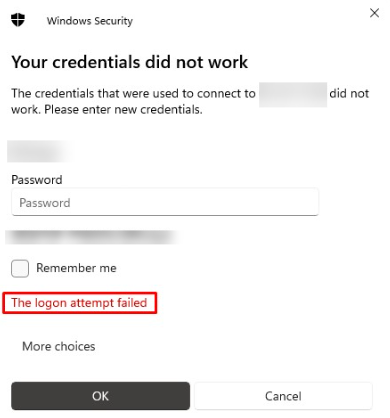
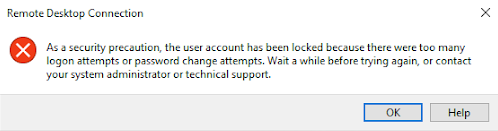
- Locked Account: Trying and failing to log in several times can actually temporarily lock your account. If this happens to you, don’t hesitate to reach out to our support via chat, where we can unlock the account for you!
- Extra Spaces in Password Always try to make sure that no extra spaces slip in when you’re typing in your password. This can also happen when you copy a password to paste it, as dragging the cursor could lead to picking up an extra space, or even missing the first or last letter. We’ve got a handy remedy for this one, though – try using the dedicated copy/paste button located in the portal!

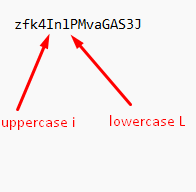
- Similar Character Confusion Some letters and numbers look a lot like one another, which can mess up your login. A couple of the most common mixups are confusing a lowercase ‘L’ (l) with an uppercase ‘i’ (I), or the letter O with the number 0. If you’re not sure which letter or number is in your password, simply paste it into Notepad or another plain text editor to see the actual characters more clearly before entering them. Check out the image below to see the subtle difference:
Solutions to Fix Credential Issues
Verify Your Credentials
-
Always double-check to make sure you’re using the right username and password.
-
Using a password manager? Check that it has the latest saved credentials and not an outdated password or username.
You can find our guide on how to find your login credentials here.
Reset Your VPS Password
Let’s say you’ve tried all possible solutions and are still encountering an error – we can always help you change your password! Since clients can’t reset their VPS password themselves through the portal, here’s how to easily contact us so we can aid you with the password reset process:
-
Reach out to our support team via chat or submit a support ticket.
-
Give us the necessary details, which typically include your VPS IP address and any error messages you’ve received. We’ll also need some additional information to verify your identity – that way, we can confirm you’re not being impersonated.
-
Our team will manually reset your password for you and securely email you your new credentials.
-
Once you get your credentials, simply log in using the new password and, for security purposes, update it.
Tips for Preventing Future Credential Issues
-
Consider using a secure password manager to safely store your login info.
-
Be sure to regularly update your passwords and keep them documented somewhere safe.
-
It’s always a good idea to enable multi-factor authentication (MFA) if supported. You can check out our guide on that here.
Follow these steps, and you should be able to regain access to your VPS in a quick and secure fashion!
